Friday, 12 September 2014

Oracle API Gateway Integration with OID 11g

1. Introduction:

1.       This document describes how to configure the Gateway to authenticate via an Oracle
 OID directory server and to extract specific Groups.
2.       From the Gateway we will configured to authenticate a user located in the Oracle OID LDAP  directory.
3.       If user authenticated successfully then only we have to give access to the Enterprise Services.      
  

  2. Configuring LDAP Directories:

       Before going to creating LDAP repository we should create the LDAP Connection.

  3. LDAP Connection Creation:

1.       Login to policy studio and connect admin server.                                                                                      
  

      1.       In Navigator click on External Connection tab -> click on LDAP Connections.


    1.       Here we have to enter LDAP Server credentials means OID Server details along with Specific            Group details then click on Test connection.


      2.  Now our ldap connection ready.       

  4. LDAP Repository Creation:

      After creation of LDAP Connection next we have to create repository, for this click on external connection tab again from navigator.
   

    1.       Click on External Connections .Within the “External Connections” Tree expand the             
           “Authentication Repository”.
2.  Right Click on “LDAP Repositories” and Click “Add a new Repository”
     
    3. Click on Add a new Repository -> enter repository details-> click ok.


   5. Configuration of the HTTP Basic filter:

  
      Now we have to apply http basic authentication to the service policy. Once deployed the service in oag we can see the service policy under API Service manager-> Services.
    
     1.       Click on Service policy. Drag HTTP Basic filter attribute from policy palate. Here we need to             browse Our ODI Repository from drop down list then click on finish.
     
                                                       
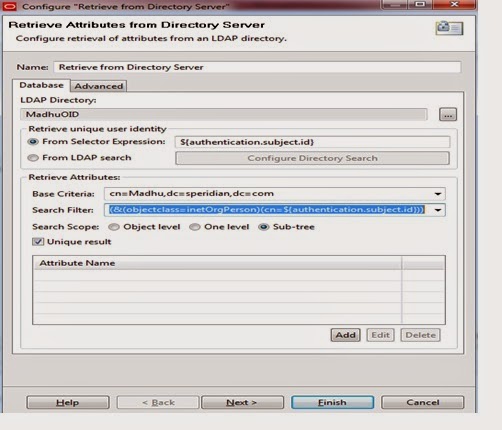
1.       Next drag one more attribute called” Retrieve from Directory Server” from palate. Here       we should browse the LDAP Directory which we created in in Repository session.                 


1.       Base Criteria you should pass as Group Name and Domain details as per OID.                            Deploy above changes into the server with the help of f6 key from keyboard.        

   6. Test the Policy from API Service Explorer

To test the policy API Service Explorer can be used to send through a message with user credentials (Username/Password).
1.       Start explorer from apigatewayexplorer folder location. This tool we are used for testing the services.
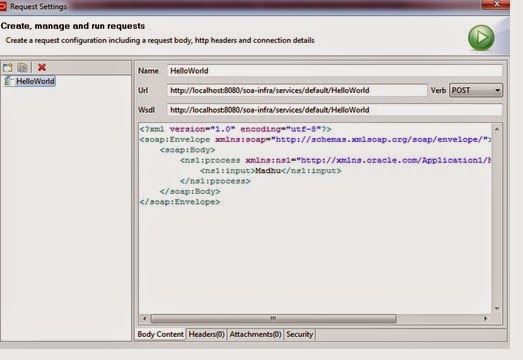
             Click on requesting option from run tab.Here we have to pass request message to the service     
  
1.    Next click on Security tab from below.


1.       Click on HTTP Authentication tab .Here we have to pass specific user details.

2.          Click on run button. 


Happy coding..!!!

Friday, 28 February 2014

Deploying Multiple SOA Composites through ANT

ANT Setup and Configuration:


1.       Download ant in your system and unzip to your local folder.
2.       Setup ANT HOME as environment variable and give path up to bin in path variable.

3.      Set JAVA HOME as well.


1.       Now you can check from command prompt  as below
Open command line enters as ant.


Build Property file:


build. properties is the file where you have to define the JDeveloper , your middleware home details and  Admin Server ,managed server credentials. 

# build file for DeployComposite

customProcessList=./customProcessList.txt

#composite.name=HelloWorld
#project.name=HelloWorld
# revision of the composite
#composite.revision=1
# Set oracle.home to <JDEV_HOME>/jdeveloper, where <JDEV_HOME> is JDEV # installation directory

wn.bea.home=D:/Oracle_FMW
oracle.home=D:/OracleJdeveloper/jdeveloper
java.passed.home=D:/OracleJdeveloper/jdk1.6.0_38
wl.home=${wn.bea.home}/wlserver_10.3

# soa-server side oracle home directory - needed for deployment plans
# and the weblogic sca library deployment

soa.server.oracle.home=D:/Oracle_FMW/Oracle_SOA

###### Deployment server connection information ###############
# the admin server connection information

admin.server.host=localhost
admin.server.port=7001

# the domain where soa infra is installed

server.domain.name=soaosb_domain

# connection information for the managed server, used for soa-deployment

managed.server.host=localhost
managed.server.port=8001

# User and credentials for the servers

server.user=weblogic
server.password=welcome1

# wls server where soa is targeted.

server.targets=soa_server1

Text Details:


Before using any of these Ant scripts that are related to code, you must create a text file.

Create this file place into your application directory where build files are present.

For example, the file may look like this:


This says that there are 2 composites to loop through; HelloWorld, Welcome. If deployed, the first 2
 will be deployed to the 'default' partition and a revision of '1.0'

Build.XML:

Here is main build.xml file it will compile the project and do the deployment in our target server.

<?xml version="1.0" encoding="UTF-8" ?>
<project name="AutomaticDeployment" default="deployComposites">
<echo message="entered screen"/>
<!-- build.properties -->
  <property environment="env"/>
  <taskdef resource="net/sf/antcontrib/antcontrib.properties"/>
  <taskdef resource="net/sf/antcontrib/antlib.xml" >
    <classpath>
      <pathelement location="${antcontrib}" />
    </classpath>
  </taskdef>
<property file="build.properties"/>
<!-- Add targets here -->
<target name="compile-package">
<property name="sca-inf.classes.dir" value="../SCA-INF/classes"/>
<mkdir dir="${sca-inf.classes.dir}"/>
<echo message="reached....${oracle.home}..........."/>
<ant antfile="${oracle.home}/bin/ant-sca-package.xml" target="package" inheritall="false">
<property name="oracle.home" value="${oracle.home}"/>
<property name="compositeDir" value="${basedir}/${project.name}"/>
<!-- needed for adf config -->
<property name="scac.application.home" value="${basedir}/${project.name}/.."/>
<!-- name of the composite -->
<property name="compositeName" value="${composite.name}"/>
<!-- revision of the composite -->
<property name="revision" value="${composite.revision}"/>
<!-- java.passed.home passed to scac, this property will be
overwritten to the env.JAVA_HOME if such env variable is defined in OS level-->
<property name="java.passed.home" value="${java.passed.home}"/>
<property name="wl_home" value="${wl.home}"/>
</ant>
</target>
<!--<target name="deploy" depends="compile-package">
<condition property="deploymentplan.name" value="null">
<not>
<isset property="${deploymentplan.name}"/>
</not>
</condition>
<echo>Deploying to http://${managed.server.host}:${managed.server.port}/soa-infra/deployer</echo>
<ant antfile="${oracle.home}/bin/ant-sca-deploy.xml" target="deploy"
inheritall="false">
<property name="user" value="${server.user}"/>
<property name="password" value="${server.password}"/>

 create the url for deployment

<property name="serverURL"
value="http://${managed.server.host}:${managed.server.port}/soa-infra/deployer"/>

location of the sar

<property name="sarLocation"
value="${deploy.dir}/sca_${composite.name}_rev${composite.revision}.jar"/>

 force overwrite if already there
<property name="overwrite" value="true"/>

configplan
<property name="configplan" value="${deploymentplan.name}"/>
</ant>
</target> -->
<target name="deployComposites">
   <available file="${customProcessList}" property="file.exists" value="true" />
    <fail unless="file.exists" message="ERROR: Filename '${customProcessList}' does not exist." />
    <loadfile property="allprocesses" srcFile="${customProcessList}"/>   
    <var name="errorCount" value="0"/>
    <var name="processCount" value="0"/>
    <var name="errorProcessNames" value="(none)"/>
    <trycatch property="tryName" reference="exception_ref">
      <try>
        <for list="${allprocesses}" param="processName" delimiter="${line.separator}">
          <sequential>
            <propertyregex property="composite.name"      input="@{processName}" regexp="(.*),(.*),(.*),(.*),(.*)" select="\1" override="true"/>
            <propertyregex property="composite.partition" input="@{processName}" regexp="(.*),(.*),(.*),(.*),(.*)" select="\2" override="true"/>
            <propertyregex property="composite.revision"  input="@{processName}" regexp="(.*),(.*),(.*),(.*),(.*)" select="\3" override="true"/>
            <propertyregex property="default.composite"   input="@{processName}" regexp="(.*),(.*),(.*),(.*),(.*)" select="\4" override="true"/>
            <propertyregex property="folder.name"         input="@{processName}" regexp="(.*),(.*),(.*),(.*),(.*)" select="\5" override="true"/>
                                                <!-- <property name="deploy.dir" value="${basedir}/${folder.name}/deploy"/> -->
            <math result="processCount" operand1="${processCount}" operation="+" operand2="1" datatype="int"/>

            <echo>
================================================================================
PACKAGE COMPOSITE #${processCount}: ${composite.name}
================================================================================
            </echo>

            <ant antfile="${oracle.home}/bin/ant-sca-package.xml" target="package" inheritall="false">
              <property name="compositeDir" value="${basedir}/${folder.name}"/>
              <property name="compositeName" value="${composite.name}"/>
              <property name="revision" value="${composite.revision}"/>
            </ant>

            <echo>
================================================================================
DEPLOY COMPOSITE #${processCount}: ${composite.name}
================================================================================
            </echo>
            <ant antfile="${oracle.home}/bin/ant-sca-deploy.xml" target="deploy" inheritall="false">
              <property name="user"                                 value="${server.user}"/>
              <property name="password"      value="${server.password}"/>
              <property name="serverURL"     value="http://${managed.server.host}:${managed.server.port}/soa-infra/deployer"/>
              <property name="sarLocation"                 value="${basedir}/${folder.name}/deploy/sca_${composite.name}_rev${composite.revision}.jar"/>
              <property name="partition"         value="${composite.partition}"/>
              <property name="overwrite"      value="true"/>
              <property name="forceDefault"                value="${default.composite}"/>
             <!-- <property name="configplan"             value="${deploymentplan.name}"/>-->
            </ant>
          </sequential>
        </for>
      </try>
      <catch>
        <property name="exception" refid="exception_ref" />
        <property name="message" value="ERROR IN TRYCATCH BLOCK:${line.separator}${exception}" />
        <echo></echo>
        <echo message="${message}" />
        <math result="errorCount" operand1="${errorCount}" operation="+" operand2="1" datatype="int"/>
        <var name="errorProcessNames" value="${composite.name}"/>
      </catch>
    </trycatch>

    <echo>
**************************************************************
*
*  ANT TARGET NAME:            deployComposites
*  FAILED PROCESS:             ${errorProcessNames}
*
**************************************************************
    </echo>
  </target>
</project>

Note:

Please place ant-contrib-1.0b3 .jar under ant home inside lib folder.you have to download from internet this jar.


your application looks like below:


happy deployment with ant.


Wednesday, 20 November 2013

HAFileAdapter in OSB Cluster Environment

If you are using jca file adapter in OSB for business service or proxy service and while deploying into  cluster Environment instead of file Adapter change to HAFileAdapter

Go to deployment in console -> click on file adapter -> click on HAFile Adapter ->go to properties -> enter below details


Go to Datasource ->jdbc/SOADataSource select target server as OSB Server
                 ->jdbc/SOALocalTxDataSource  select target server as OSB Server


Wednesday, 25 September 2013

Complex Flat File fixed length in NXSD

Ex:
          20130210                                                            à  Header 
0001284576196106212013062820130728                  à Details unbounded
0001284578196106212013062820130728
0001284580201210242013060120130604
0001284582193205082013102420141024
0001284584192103222013091420140914
0001302574192610152013092820140928
1111111111    6                                                            à Trailer  

NXSD Structure


<?xml version="1.0" encoding="UTF-8" ?>

<xsd:schema xmlns:xsd="http://www.w3.org/2001/XMLSchema"
            xmlns:nxsd="http://xmlns.oracle.com/pcbpel/nxsd"
            xmlns:tns="http://xmlns.nxsd.madhu/sampleFlatFile"
            targetNamespace=" http://xmlns.nxsd.madhu/sampleFlatFile"
            elementFormDefault="qualified"
            attributeFormDefault="unqualified"
            nxsd:version="NXSD"
            nxsd:stream="chars"
            nxsd:encoding="US-ASCII">


  <xsd:element name="Root-Element">
    <xsd:complexType>
      <xsd:sequence>
        <xsd:element name="Request" type="tns:RequestType" />
      </xsd:sequence>
    </xsd:complexType>
  </xsd:element>


  <xsd:complexType name="DetailsType">

    <xsd:sequence>
      <xsd:element name="empId" type="xsd:string" minOccurs="0" nxsd:style="fixedLength" nxsd:length="10" nxsd:padStyle="tail" nxsd:paddedBy=" " />
      <xsd:element name="DOB" type="xsd:string" minOccurs="0" nxsd:style="fixedLength" nxsd:length="8" nxsd:padStyle="tail" nxsd:paddedBy=" " />
      <xsd:element name="joinDate" type="xsd:string" minOccurs="0" nxsd:style="fixedLength" nxsd:length="8" nxsd:padStyle="tail" nxsd:paddedBy=" " />
      <xsd:element name="joinEndDate" type="xsd:string" minOccurs="0" nxsd:style="fixedLength" nxsd:length="8" nxsd:padStyle="tail" nxsd:paddedBy=" " />
      <xsd:element name="Filler" type="xsd:string" nxsd:style="terminated" nxsd:terminatedBy="${eol}" />
    </xsd:sequence>
  </xsd:complexType>


  <xsd:complexType name="RequestType">
    <xsd:sequence>
      <xsd:element name="Header" type="tns:HeaderType" minOccurs="0" />
      <xsd:element name="Details" type="tns:DetailsType" maxOccurs="unbounded"    nxsd:style="array" nxsd:cellSeparatedBy="" nxsd:arrayTerminatedBy="1111111111" />
      <xsd:element name="Trailer" type="tns:TrailerType" minOccurs="0" />
    </xsd:sequence>
  </xsd:complexType>


  <xsd:complexType name="HeaderType">
    <xsd:sequence>
      <xsd:element name="HeaderID" type="xsd:string" nxsd:style="fixedLength" nxsd:length="10" />
      <xsd:element name="FileDate" type="xsd:string" nxsd:style="fixedLength" nxsd:length="8"                       nxsd:padStyle="tail" nxsd:paddedBy=" " />
 <xsd:element name="HeaderFiller" type="xsd:string" nxsd:style="terminated"            nxsd:terminatedBy="${eol}" />
    </xsd:sequence>
  </xsd:complexType>


  <xsd:complexType name="TrailerType">
    <xsd:sequence>
      <xsd:element name="TrailerID" type="xsd:string" nxsd:style="fixedLength" nxsd:length="10" nxsd:padStyle="tail" nxsd:paddedBy=" " nxsd:prefixWith="1111111111" />
      <xsd:element name="TotalEmpRecords" type="xsd:string" nxsd:style="fixedLength" nxsd:length="8" nxsd:padStyle="tail" nxsd:paddedBy=" " />
      <xsd:element name="TrailerFiller" type="xsd:string" nxsd:style="terminated" nxsd:terminatedBy="${eol}" />
    </xsd:sequence>
  </xsd:complexType>


</xsd:schema>     

Happy coding ....!

Friday, 2 August 2013

Creating Native Schema Files with the Native Format Builder Wizard

Defining Complex Condition in choice Condition
Using Native format builder we can pick different kind of records from flat file.
Sample file:

016404460A  TCHAPRASTE VASKEN          M19480901016404460D 120A86   200305      201308             967465840040 E
016463006ABARLLESLEYAF19541129016463006P120B1161 2013012013050005245020130501049000000000{    967459010010  0001031458310485698TBIDDLE MARILYN JF19450807310485698    120C2361  307322486D  20130320130330              0001282100575470305A  PARK   YOUNG OF19470823575470305P  120D3061 201203 2013033060048    020  0001282324


Native Data Format to Be Translated:


The choiceCondition construct is used along with the conditionValue construct for records that are complex and may have fields delimited by fixed length. The other choiceCondition types available are FixedLength, Variable. The following example is for the variable choiceCondition type.
Native Schema:
<?xml version="1.0" encoding="UTF-8" ?>

<xsd:schema xmlns:xsd="http://www.w3.org/2001/XMLSchema"
            xmlns:nxsd="http://xmlns.oracle.com/pcbpel/nxsd"
            xmlns:tns="http://TargetNamespace.com/filewrite"
            targetNamespace="http://TargetNamespace.com/filewrite"
            elementFormDefault="qualified"
            attributeFormDefault="unqualified"

            nxsd:version="NXSD"
            nxsd:stream="chars"
            nxsd:encoding="US-ASCII"
> 


  <xsd:element name="Root-Element">
    <xsd:complexType>
      <xsd:choice minOccurs="0" maxOccurs="unbounded" nxsd:choiceCondition="${X}" nxsd:lookAhead="75" nxsd:scanLength="1" nxsd:assignTo="${X}">
        <xsd:element name="RecordA" type="tns:RecordIdentificationCodeAType" nxsd:conditionValue="A" />
        <xsd:element name="RecordB" type="tns:RecordIdentificationCodeBType" nxsd:conditionValue="B" />
                                <xsd:element name="RecordC" type="tns:RecordIdentificationCodeCType" nxsd:conditionValue="C" />
                                <xsd:element name="RecordD" type="tns:RecordIdentificationCodeDType" nxsd:conditionValue="D" />
                               
      </xsd:choice>
    </xsd:complexType>
  </xsd:element>

<xsd:complexType name="RecordIdentificationCodeAType">
    <xsd:sequence>
      --------------------
---------------------------------
</xsd: sequence>
</xsd:complexType>
<xsd:complexType name="RecordIdentificationCodeBType">
    <xsd:sequence>
      --------------------
---------------------------------
</xsd: sequence>
</xsd:complexType>
<xsd:complexType name="RecordIdentificationCodeCType">
    <xsd:sequence>
      --------------------
---------------------------------
</xsd: sequence>
</xsd:complexType>
<xsd:complexType name="RecordIdentificationCodeDType">
    <xsd:sequence>
      --------------------
---------------------------------
</xsd: sequence>
</xsd:complexType>

Translated XML Using Native Schema:

<?xml version = '1.0' encoding = 'UTF-8'?>
<Root-Element xmlns="http://TargetNamespace.com/filewrite">
   <RecordA></RecordB>
   <RecordB></RecordB>
   <RecordC></RecordC>
   <RecordD></RecordD>

</Root-Element>

Oracle Opatch utility 12c

 Hi Blog Viewers, This post will describes the how to apply single or multiple patches at a time. Prerequisites : Set the Oracle Home and Op...